> ## Documentation Index
> Fetch the complete documentation index at: https://docs.reclaimllm.com/llms.txt
> Use this file to discover all available pages before exploring further.
# SOC 2 Evidence for AI Coding Assistants
> Track AI coding controls, inspect populations like RC-AI-02, log risk exceptions, export CSV evidence packs with a SHA-256 manifest, and run access reviews.
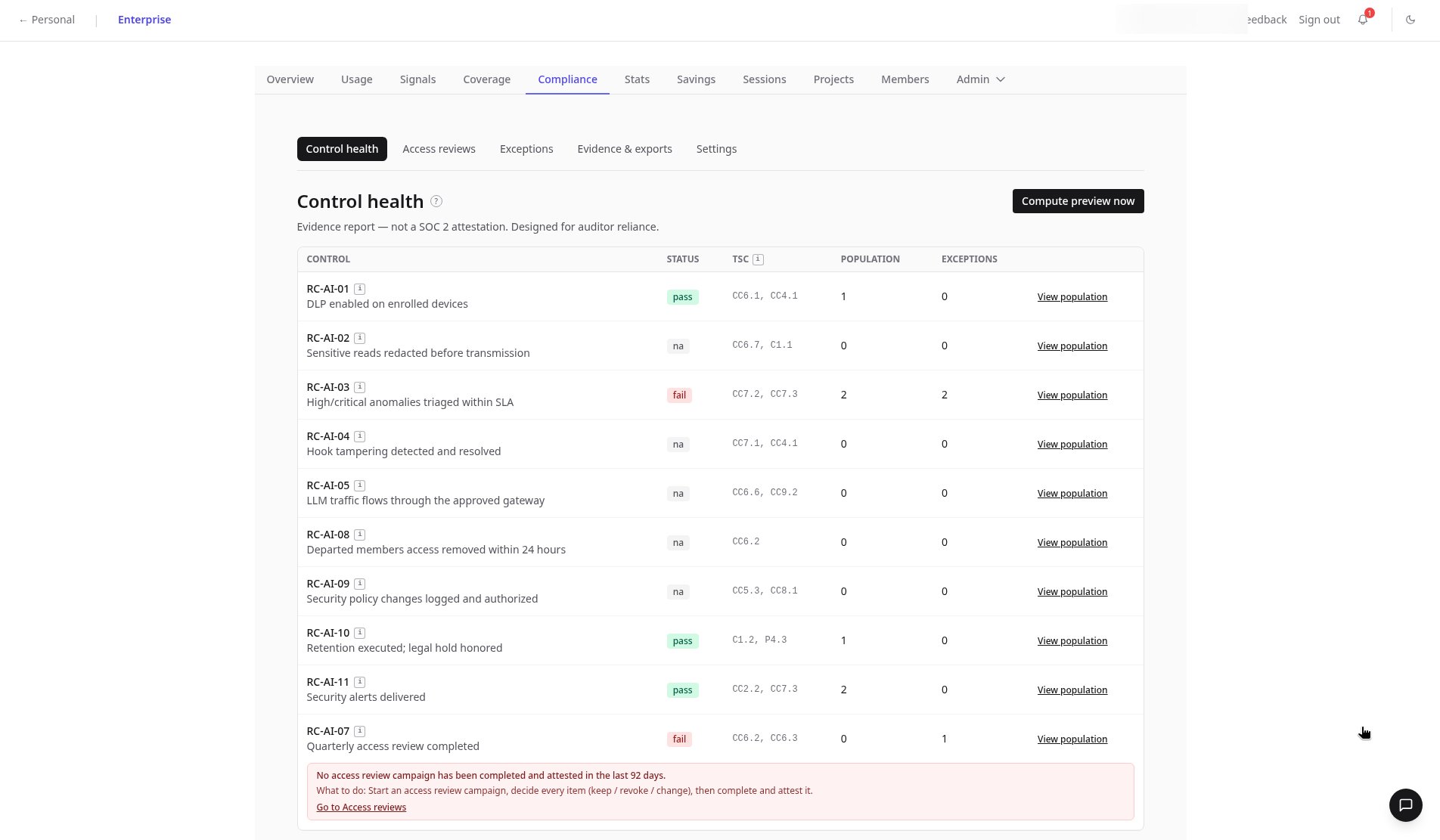
Auditors are starting to ask how your team controls AI coding tools. The Compliance page lists each AI control with its status and SOC 2 Trust Services Criteria (TSC) mapping, shows the population behind it, and exports evidence your reviewers can verify.
These controls help you collect evidence for your own audits. ReclaimLLM's own SOC 2 Type II is targeted for Q4 2026; it is not yet certified.
## Prepare audit evidence
The **Control health** tab lists each RC-AI control with pass, fail, or n/a status, TSC mapping, and population and exception counts. Failed controls, like an overdue quarterly access review, are flagged.
Click **View population** to see the evidence entries behind a control. Entries contain no session content.
Accept a known risk with **Request exception** in the **Risk exceptions** register.
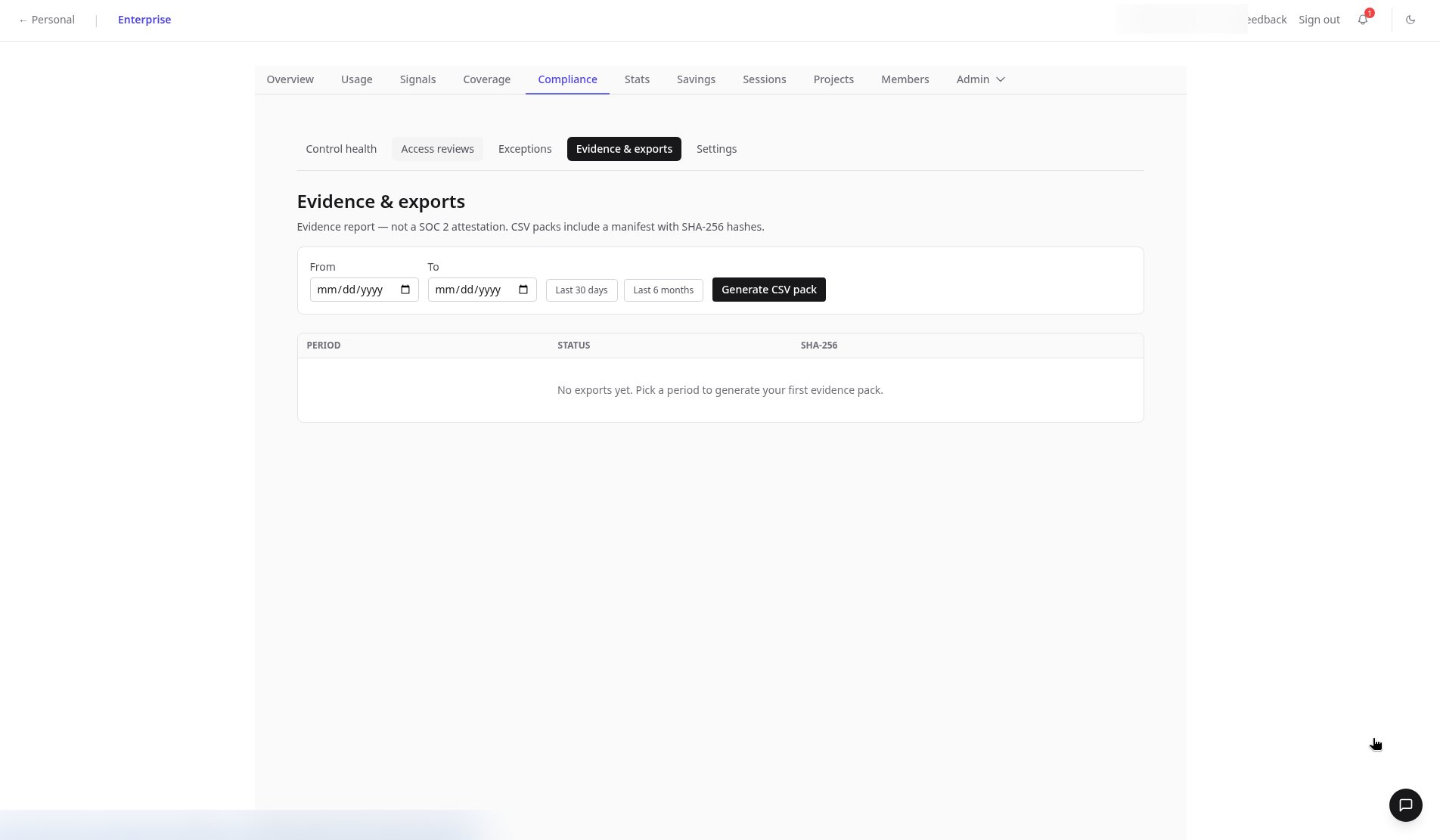
In **Evidence & exports**, pick a period and click **Generate CSV pack**. Packs include a SHA-256 manifest so reviewers can verify nothing changed.
Use **Create campaign** in **Access reviews** to review gateway keys, members, and API keys.
## Example: RC-AI-02 population
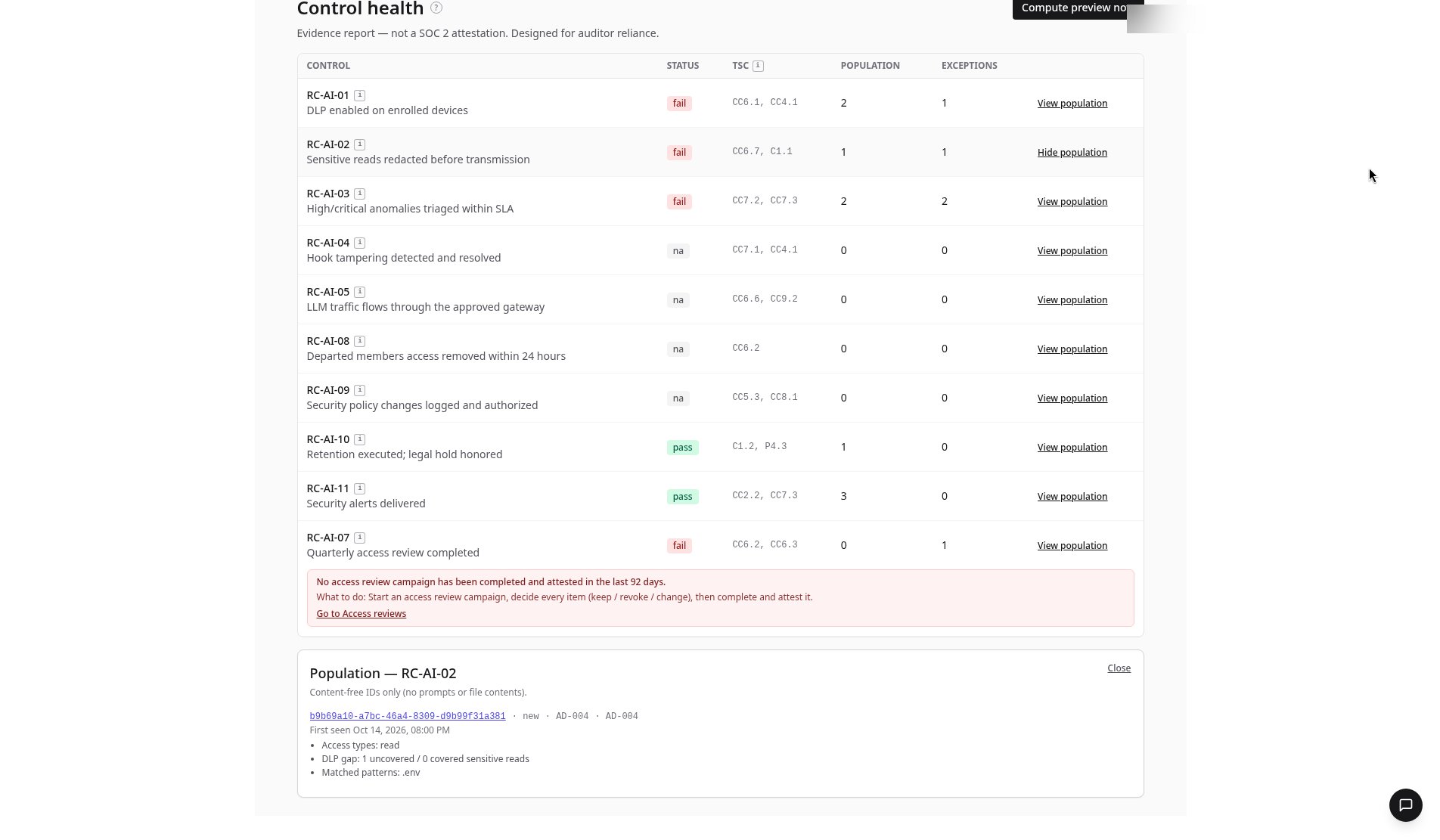
RC-AI-02 checks that sensitive reads are redacted before transmission. Opening **View population** shows a linked session, `b9b69a10-a7bc-46a4-8309-d9b99f31a381`, with status **new** and flagged **AD-004**:
| Fact | Value |
| - | - |
| **First seen** | Oct 14, 2026, 08:00 PM |
| **Access types** | read |
| **Matched patterns** | `.env` |
| **DLP gap** | 1 uncovered / 0 covered sensitive reads |
The DLP gap means one sensitive read happened that no policy covered. One click opens the session itself.
## FAQ
Not yet. ReclaimLLM's SOC 2 Type II is targeted for Q4 2026. The Compliance page helps you gather evidence about your own AI coding controls.
CSV files for the period you pick, with a SHA-256 manifest so reviewers can confirm the files haven't changed.
It counts sensitive reads that were not covered by a policy versus those that were. In the RC-AI-02 example, one .env read was uncovered.
## Related
* Reference: [Compliance tab](/enterprise/dashboard/compliance)
* Product: [ReclaimLLM compliance](https://reclaimllm.com/compliance)
This documentation is built and hosted on [Mintlify](https://mintlify.com), a developer documentation platform.
 ## Example: RC-AI-02 population
RC-AI-02 checks that sensitive reads are redacted before transmission. Opening **View population** shows a linked session, `b9b69a10-a7bc-46a4-8309-d9b99f31a381`, with status **new** and flagged **AD-004**:
| Fact | Value |
| - | - |
| **First seen** | Oct 14, 2026, 08:00 PM |
| **Access types** | read |
| **Matched patterns** | `.env` |
| **DLP gap** | 1 uncovered / 0 covered sensitive reads |
The DLP gap means one sensitive read happened that no policy covered. One click opens the session itself.
## Example: RC-AI-02 population
RC-AI-02 checks that sensitive reads are redacted before transmission. Opening **View population** shows a linked session, `b9b69a10-a7bc-46a4-8309-d9b99f31a381`, with status **new** and flagged **AD-004**:
| Fact | Value |
| - | - |
| **First seen** | Oct 14, 2026, 08:00 PM |
| **Access types** | read |
| **Matched patterns** | `.env` |
| **DLP gap** | 1 uncovered / 0 covered sensitive reads |
The DLP gap means one sensitive read happened that no policy covered. One click opens the session itself.
 ## FAQ